Demo hubs
Owners and admins. A demo hub collects published demos on one public page, organized in categories, with one link to share. Use hubs for product tours, help centers, onboarding libraries or sales collateral. When you need to know who completed what, use a training course instead.
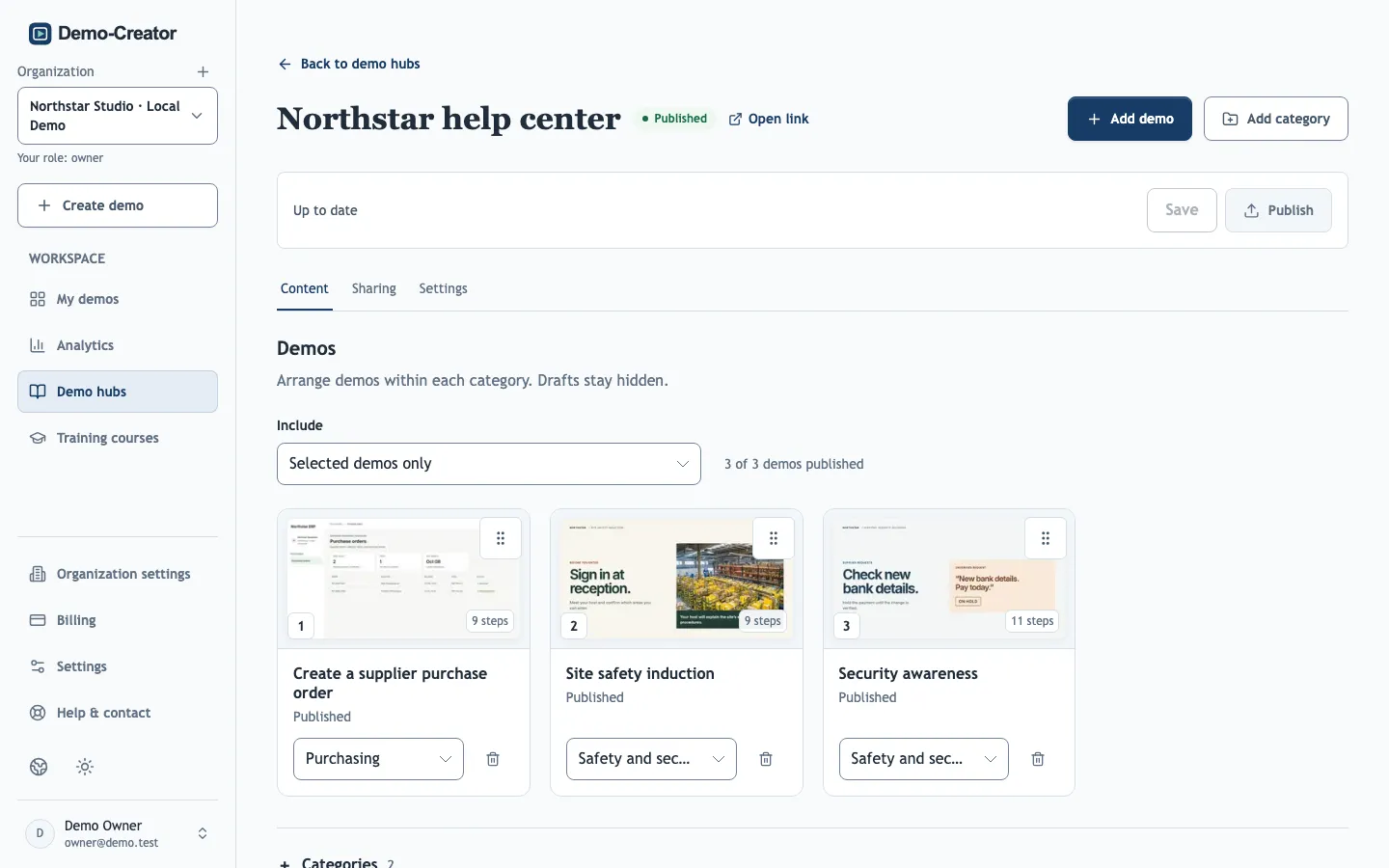
Choose the demos
- All demos includes every published demo of the organization, and demos you publish later appear automatically. Use it for a complete library.
- Selected demos only shows just the demos you add. Use it for a curated page, such as one per customer or product.
Categories become the sections of the public page. Removing a category moves its demos to Other demos; it never deletes a demo. Drafts can be placed in advance and appear publicly once published.
The hub's Title and Description in Settings head the public page.
Access
The hub can be protected with a password, allowed email addresses or domains, or an expiry date, as for individual demos. These settings protect the hub page only: each demo keeps its own link and its own access settings, so a public demo remains public even in a protected hub.
Publish and update
Hub changes are saved as a private draft until you publish them, like demos. Unpublish disables the hub link; Delete demo hub removes it for good. Neither affects the demos or their own links.
The public page always shows the published version of each demo. Unpublishing or deleting a demo removes it from the hub immediately.