Share links and embeds
Share & export is available once a demo is published, from the editor or the dashboard. It always shares the published version.
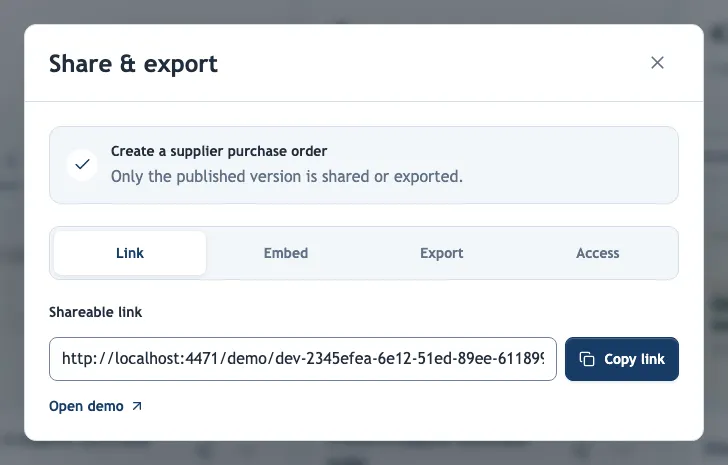
Link
Anyone with an unrestricted link can view the demo without an account. The link opens in the demo's main language; add ?lang= and a language code, for example ?lang=de, to open a translation directly.
Recipient links
Paid plans; owners, admins and editors. People creates a link for one person, such as a prospect, with Create link, which copies it or, when the browser blocks copying, selects it below the form. It opens the same published demo with the same access protection, and sessions opened through it appear under that person's name in Analytics → Recipient links. The first open and the first time they finish send alerts to owners and administrators.
A forwarded link still counts for the person it was created for, so create one link per person. Removing a link keeps it working as the demo's public link, but its opens are no longer attributed or announced. A demo can have up to 500 recipient links.
Embed
Both snippets show the same player as the link, in a compact layout without the page header. They are sized 100% wide and 480 px high (vertical demos: up to 420 px wide and 820 px high); change the height in the style attribute to fit your page.
| Snippet | Use it when |
|---|---|
| Iframe | Your site or content management system accepts only an <iframe>. Add &lang=de to the src address to choose the language. |
| JavaScript | You can add scripts. The script lets the player request autoplay for narration, and data-language="de" on the <div> chooses the language. Several demos can share one script. |
If the host page has a Content Security Policy, allow your Demo-Creator address in script-src and frame-src. Protected demos ask for the password or email inside the embed.
Paste the link elsewhere
When the demo has no password or email list, chat apps, social networks and email tools that build link previews show its title, description and first screenshot, with covers and blurs applied. Tools that support oEmbed embed the playable demo from the pasted link alone, without a snippet.
Protected demos never reveal their title, description or screenshot in a preview and are not embedded from a link. After you republish, previews use the new version, but apps that already fetched the link may keep their copy for a while.
Access protection
The Access tab restricts who can open the link and its embeds. Settings combine: with a password and an email list, viewers need both. Saving revokes access granted under the earlier settings.
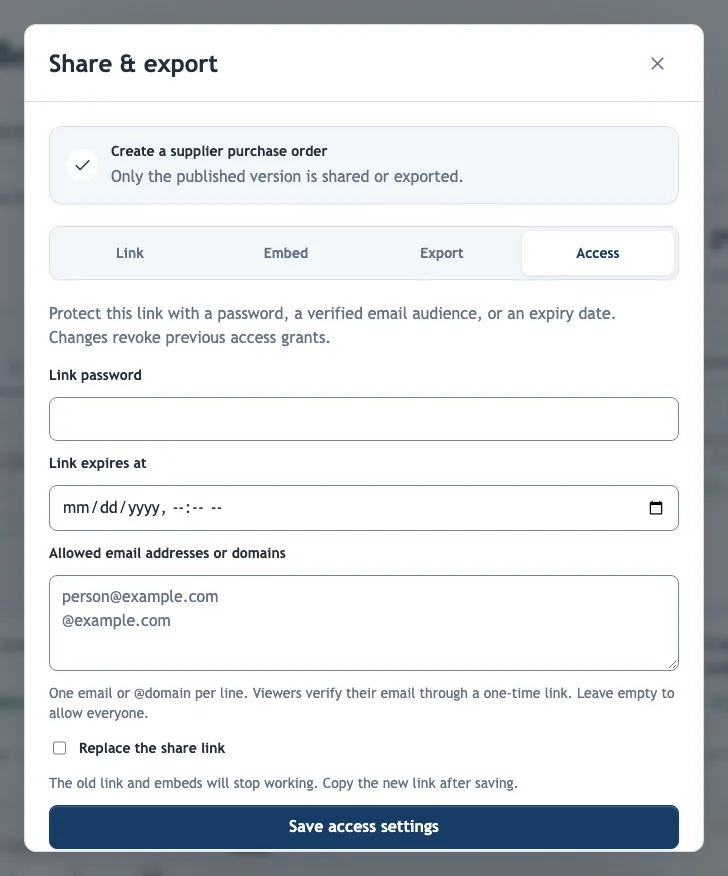
| Setting | Effect |
|---|---|
| Link password | Viewers must enter the password. Leave the field blank to keep an existing password. |
| Allowed email addresses or domains | One email or @domain per line. Viewers enter their email and open a one-time link sent to it, valid for 15 minutes. Access then lasts 24 hours on that device. |
| Link expires at | The link stops working after this date and time. |
| Replace the share link | Creates a new link. The old link and existing embeds stop working, so use it when a link leaked; copy the new link after saving and update your embeds. |
Members of your organization can always preview their own protected demos. Unpublishing stops link and embed access but cannot recall files that were already downloaded.
Custom domain
When your organization has a custom domain, new links and embeds use it automatically. Links on the main address keep working.