Review and comments
The Review panel in the editor's top bar lets a colleague check a draft before it goes live, and lets members discuss it with comments. Opening it saves your pending edits first.
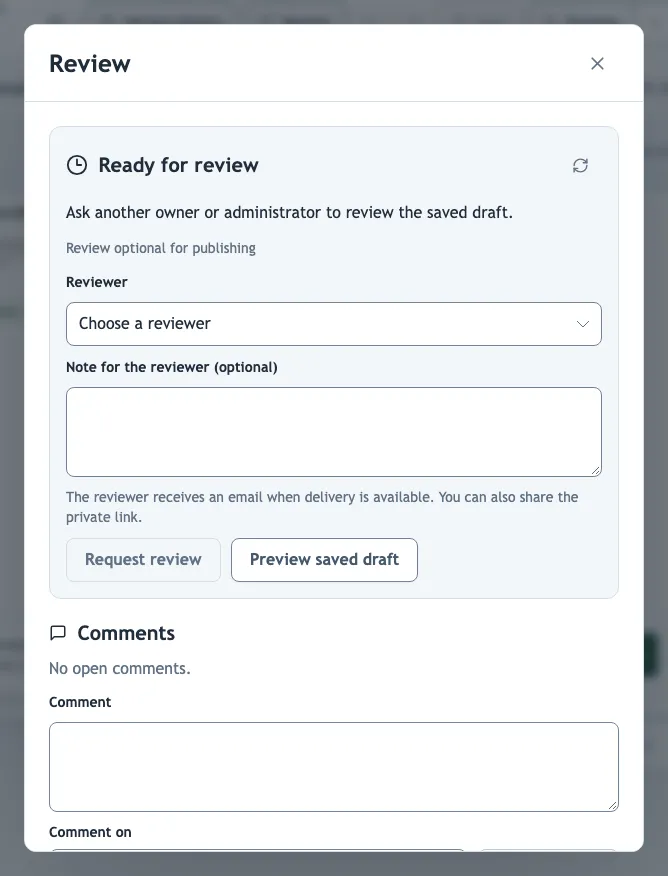
Request a review
Editors, owners and administrators. Reviewers must be another owner or administrator of the organization; you cannot review your own draft. The reviewer receives an email when email delivery is available. You can also copy the Private review link and send it yourself: it requires sign-in with access to the organization and never makes the draft public.
Review a draft
The selected reviewer. Preview saved draft plays the draft as viewers would see it. Then choose Approve draft, or Request changes with feedback explaining what to fix.
Only the selected reviewer can decide. Other members can preview and comment. If someone edits the draft during the review, the panel shows Draft changed; reload it before deciding, because a decision applies to the exact saved draft.
After the decision
| Status | Meaning and next step |
|---|---|
| Approved | Ready to publish, directly from the Review panel. |
| Changes requested | Address the feedback in the editor, save, then request review again. |
| Review needed again | The draft or the publishing requirement changed after approval. Request a new review. |
| Awaiting review | Waiting for the reviewer. |
Any edit after approval needs a new review.
Require approval before publishing
Owners and administrators. Require administrator approval before publishing blocks publishing the demo until another owner or administrator approves the current draft. It is set per demo and off by default. Use it for demos with legal, safety or customer-facing content.
Comments
Comments can address the whole demo, a single step or a quiz question, so feedback stays next to what it is about. The comment's author or an organization administrator can resolve and reopen comments. Comments on deleted steps keep their text and show Removed step.
Members with the viewer role can read the review status and comment, but cannot request reviews, approve or publish.