PDF, PowerPoint and video exports
Exports turn the published demo into files for printing, email, slide decks or video platforms. They are in Share & export → Export, in the Export language you choose: the main language or any published translation.
PDF
Download reuses the layout you last chose in this browser; Customize opens the Export PDF wizard.
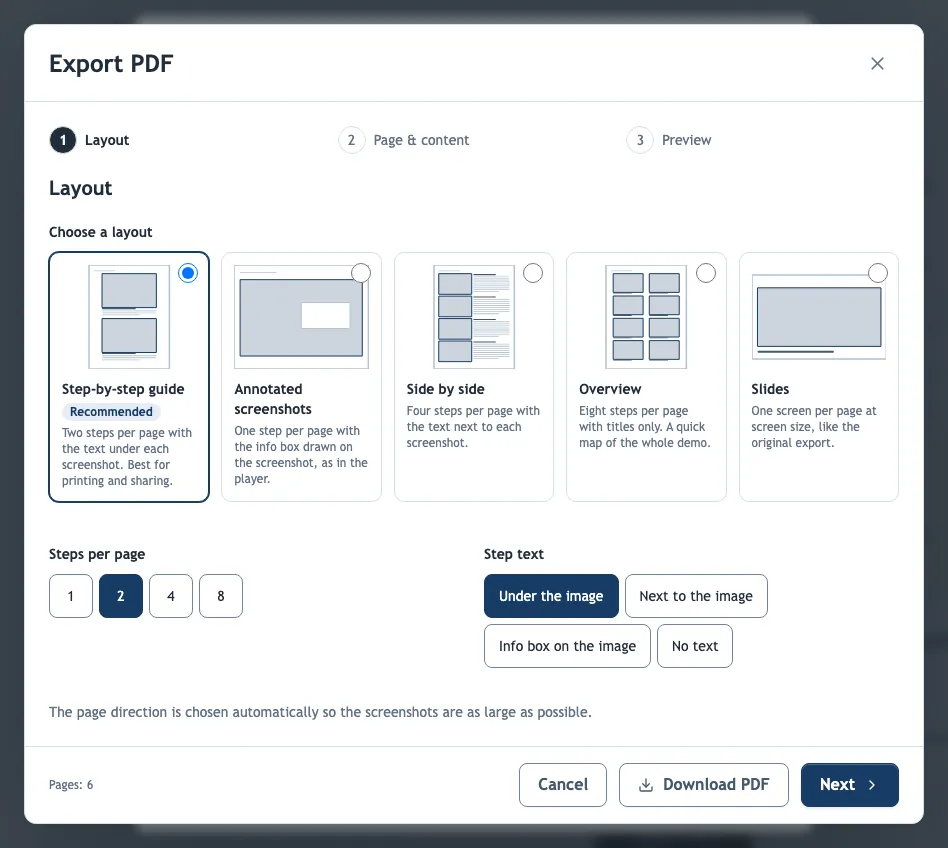
| Preset | Pages | Good for |
|---|---|---|
| Step-by-step guide | Two steps per page with the text under each screenshot. | Printed work instructions |
| Annotated screenshots | One step per page with the info box drawn on the screenshot. | Detailed screens, reading on screen |
| Side by side | Four steps per page with the text next to each screenshot. | Compact reference guides |
| Overview | Eight steps per page with titles only. | A one-glance map of a long workflow |
| Slides | One screen per page at screen size. | Handouts that look like the player |
Changing Steps per page or the Step text placement turns the preset into Custom. Image quality High (up to 300 dpi) suits print; Standard (150 dpi, smaller file) keeps email attachments small.
Text in the PDF is selectable and searchable, and every step has a bookmark, so readers can jump through long guides. Text inside the screenshots remains part of the image. A step whose text box is hidden exports without its text.
PowerPoint (.pptx)
Every screen becomes an image slide, with the step title, instruction and narration script in the speaker notes. Slide text and hotspots are part of each image, so edit the demo rather than the deck and export again.
Video
The video plays every screen in order with its timing, narration and background music. It is recorded in your browser in real time, so a long demo takes as long to export as it takes to play; keep the tab open until it finishes. The file format depends on the browser, and some browsers cannot export video at all.
LMS package
LMS package downloads the demo for a learning management system as SCORM 1.2, SCORM 2004 or cmi5. Unlike the files above, it plays the published demo from Demo-Creator and reports completion and quiz scores to the LMS; see LMS packages.
What exports do not include
Exports are static: clickable hotspots, playable narration (except in video) and quiz scoring stay in the interactive demo. Share the link alongside a file when readers need these.
Exports always use the published version. After you publish changes, download a new export; earlier files do not update.